
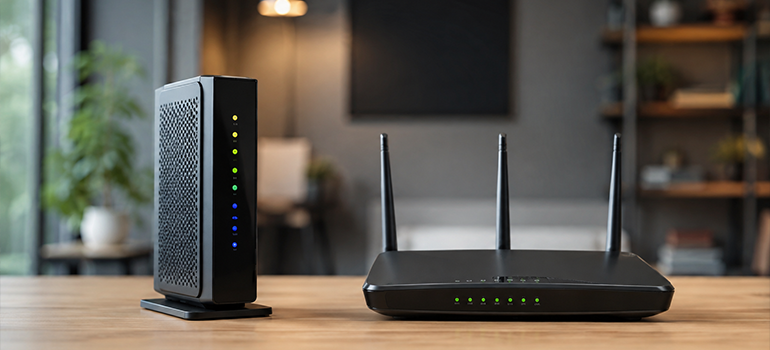
Introduction
A reliable internet connection is essential for home, businesses, and organizations. However, two key devices that make internet connection possible are modem and the router. A modem takes internet signals from your service provider, whereas a router takes the internet from the modem and distributes it to your connected devices.
In this blog, let’s understand what is a modem, a router, key differences between modem and router, and how to choose the right equipment for a reliable internet connection.
What is a Modem?
Modem is a short form for modulator-demodulator. Modem links your home/office network to Internet Service Provider (ISP) by converting digital data into analog signals and vice versa. In simple terms, you can consider modem as a “translator” between your ISP and the local network.
Example:
A cable modem is responsible for converting digital data into analog signals that travel through the cable. It also converts the incoming signals back into digital data. Further, the modem passes the internet connection to the router and then distributes internet to connected devices.
However, not all internet connections use traditional modem. In case of fiber connection, the role of a modem is replaced by an Optical Network Terminal(ONT) or Optical Network Unit(ONU). They are widely used in FTTH, FTTB, Business Networks, Data Centers, Cellular Networks, Defense and Security, and Healthcare and Education.
Types of Modems
- DSL Modem
- Cable Modem
- Fiber Modem
- Dial-up Modem
What is Router?
The router takes the internet connection from the modem, and distributes it among multiple connected devices, such as Laptop, Smartphone, Tablets, and SmartTVs. It plays a vital role not only in home Wi-Fi connections, but also in large organizations and SMBs.
A router can provide connection through:
- Ethernet cables
- Wi-Fi
A router typically creates a local network and shares internet connection with connected devices. Additionally, the router creates an IP address to your network, allowing devices to access the internet.
Difference between a Modem and a Router
| Differences | Modem | Router |
| Role | Connects to Internet Service Provider(ISP) | Distributes the internet connection |
| Layer | Data Link Layer(Layer 2) | Network Layer (Layer 3) |
| Creates a local network | No | Yes |
| Provides Wi-Fi | No | Yes |
| Connects multiple devices | No | Yes |
| Ports | 1 ethernet port connected to router | 2/ 4/ 5 /8 |
| Dependency | A modem can work without a router | Routers can share information between computers, but cannot connect to the internet without a modem. |
| Data transmission form | Packet | Packet |
| Security features | Limited security features | Advanced level security features- firewalls, access controls, and more |
| Data traffic | Modem doesn’t manage data traffic | Router easily manages data flow between the devices |
| Replacement cycle | Less frequent | Upgraded more often |
| Device type | Internetworking device | Networking device |
| IP address | A standalone modem can have a public IP address, which is assigned by your ISP. | A router has a private IP address that it uses to communicate with devices within your local home/office network. |
Do you need both a Modem and Router?
In most internet setups, you need both a modem and a router. A modem connects your premises(home or office) to your ISP and brings the internet signal. There is no external connectivity without a modem. The router then takes this internet connection and distributes it across multiple connected devices, allowing Wi-Fi access and traffic control. However, if you connect your device directly to the modem, you will be limited to using just one device with minimal functionality.
Can a Router Work Without Modem?
Yes, you can use a router without a modem, but you will not have internet access. A router itself can not create an internet connection. Typically it requires a modem (for cable or DSL connection) or a ONT (fiber connections).
In some apartments or enterprise networks, the Internet Service Provider (ISP) provides a direct Ethernet connection, thereby allowing the router to connect to devices without the need for a separate modem. In this case, the connection arriving at your location is already on an Ethernet network connection that your router can use directly.
Does the modem or router provide Wi-Fi?
A router is a device that creates a Wi-Fi network, thereby allowing the devices, such as laptops, phones, and smart TVs to connect to the internet wirelessly. In contrast, a modem is responsible for connecting your home/office network to ISP, but doesn’t provide a Wi-Fi connection, unless it is a modem-router combo device, which combines both functions into a single unit
How to Choose the Right Modem or Router?
- Check ISP Compatibility
Make sure the modem you choose is compatible with the Internet Service Provider(ISP) and the connection type.
- Choose the Right Internet Speed
Choose the equipment that supports the maximum internet speed of your plan.
- Check for Wi-Fi Coverage
While choosing a router, consider the size of your home/office and the number of devices that need Wi-Fi connection.
- Consider Security Features
Look for the security features, such as guest networks, access controls, firewalls, and others, that help you protect your network. So, choose a device that meets your security needs.
- Consider Scalability Needs
Choose an equipment that can support your future needs, such as adding more devices or upgrading a faster internet plan, while maintaining a stable internet performance.
- Check Ethernet Ports
Check for the number of wired devices that you need to connect, such as gaming consoles or computers and choose the one accordingly.
- Consider Advanced Features
Features such as device management, traffic management, and parental controls can provide greater control over your home network.
Conclusion
Understanding what a modem and a router are is essential to make the best decision for your internet service. Before purchasing networking equipment, check ISP compatibility, internet speed, Wi-Fi coverage, security features, and the number of devices you need to connect. Ultimately, the success of internet connectivity depends on choosing the right internet service provider and networking equipment to cater your needs.


